光线追踪
Vite 内置了 NvRTX 4.27 Caustics 和 NvRTX 5.0 的光线追踪套件。在默认版本中,反射、阴影、环境光遮蔽和天空光可用;其余效果会被 VITE_RT_PSO_DEBLOAT 编译移除。在调试看似无效的控制台变量之前,请先阅读下方的可用性表格。
Vite 中的光线追踪是一个与引擎无关的管线:加速结构独立于任何单一的光照解决方案,因此每个效果都可以单独启用或禁用。UE 4.27 采用了这种架构,而 UE 5.1 及更高版本则摒弃了这种架构——参见为什么使用 NvRTX 4.27。
可用性
编译时开关 VITE_RT_PSO_DEBLOAT 默认值为 1,它会移除 Vite 推荐配置之外的效果的着色器排列组合。光线追踪 PSO 必须编译并绑定,无论其控制台变量是否设置,因此将未使用的效果编译在内存中会白白浪费着色器构建时间、包大小和管线创建时间。
实际后果是:设置已编译移除的效果的控制台变量看似成功,但实际上不会渲染任何内容。
| 效果 | 控制台变量 | 默认构建 | 页面 |
|---|---|---|---|
| 反射 | r.RayTracing.Reflections |
可用 | RT 反射 |
| 阴影 | r.RayTracing.Shadows |
可用 | RT 阴影和 AO |
| 环境光遮蔽 | r.RayTracing.AmbientOcclusion |
可用 | RT 阴影和 AO |
| 天空光 | r.RayTracing.SkyLight |
可用 | 此页面 |
| 半透明 | r.RayTracing.Translucency |
已编译 | RT 半透明和焦散 |
| 网格焦散 | r.RayTracing.MeshCaustics.Enable |
已编译 | RT 半透明和焦散 |
| 水焦散 | r.RayTracing.WaterCaustics.Type |
已编译 | RT 半透明和焦散 |
| 采样直接光照 (RTXDI) | r.RayTracing.SampledDirectLighting |
已编译 | RTXDI |
| 逐像素全局光照 | r.RayTracing.GlobalIllumination |
已编译 | 本页 |
| 反射捕捉和探测 | r.RayTracing.Reflections.RayTraceEnvironmentCaptures |
已编译 | RT 反射 |
| 路径追踪 | r.PathTracing |
已编译 | 路径追踪 |
要使用编译输出集中的任何内容,请使用 VITE_RT_PSO_DEBLOAT=0 重新构建。请参阅编译时开关。
即使反射可用,也存在一个额外的注意事项:debloat 开关会强制使用排序延迟反射算法,并编译掉旧的非延迟路径。
动态 DDGI 是一个独立的系统,它通过 r.GlobalIllumination.ExperimentalPlugin 而不是 r.RayTracing.* 组启用,并且不受 debloat 开关的影响。请参阅动态 DDGI。这是《黑神话:悟空》所用的渲染堆栈。
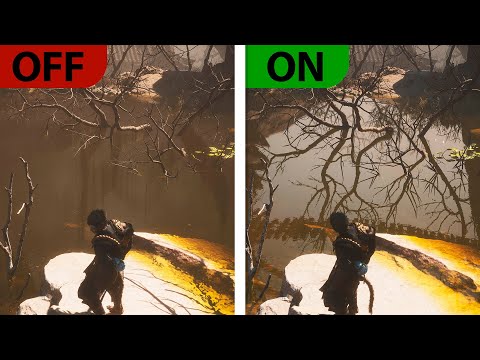
启用和禁用
来自代码:
IConsoleManager::Get().FindConsoleVariable(TEXT("r.RayTracing.AmbientOcclusion"))->Set(1);
IConsoleManager::Get().FindConsoleVariable(TEXT("r.RayTracing.Reflections"))->Set(1);
IConsoleManager::Get().FindConsoleVariable(TEXT("r.RayTracing.Shadows"))->Set(1);
从配置方面来说,这是项目交付时应该使用的:
; Config/DefaultEngine.ini
[/Script/Engine.RendererSettings]
r.RayTracing.Reflections=1
r.RayTracing.Shadows=0
r.RayTracing.AmbientOcclusion=0
r.RayTracing.Translucency=0
r.RayTracing.ForceAllRayTracingEffects 1 会一次性启用所有光线追踪效果。请将其视为诊断工具——用于查看光线追踪效果的上限并审核场景对哪些效果做出响应——而不是最终的发布设置。r.RayTracing.ForceAllRayTracingEffects 0 会强制关闭所有光线追踪效果,这是确定光线追踪占用帧时间比例的最快方法。
剔除和成本控制
光线追踪的成本与加速结构中的几何体数量成正比,因此在降低效果质量之前,剔除是首先应该考虑的因素。
GEngine->Exec(nullptr, TEXT("r.RayTracing.Culling.UseMinDrawDistance 1"));
这使得光线追踪剔除能够遵循每个图元的最小绘制距离,这在包含大量细小网格的场景中是一个成本低廉且通常安全的改进。
除了剔除之外,以下是一些常用的优化方法,大致按有效性排序:
- 减少启用的效果数量。关闭效果的成本总是比优化效果的成本更低。
- 降低效果分辨率——大多数效果都支持半分辨率或四分之一分辨率的缓冲区。
- 减少采样数和最大反弹深度。
- 减少每个图元参与光线追踪的几何体数量。
AMD 硬件
Vite 集成了 AMD GPUOpen RT 优化以及多项针对游戏主机的 AMD RDNA 定制 GPU 优化。RDNA2 硬件上的光线追踪性能是首要考虑因素,而非事后考虑,这直接源于 PS5 级别的性能目标。
基于 RDNA 的主机和掌机硬件
| 硬件 | GPU 架构 | GPU 配置 |
|---|---|---|
| PlayStation 5 | 基于 RDNA 2 架构的定制 GPU | 36 个计算单元 (CU),最高可达 10.28 TFLOPS |
| PlayStation 5 Pro | 基于 RDNA 架构的定制 GPU* | 60 个计算单元 (CU),16.7 TFLOPS |
| Xbox Series X | RDNA 2 | 52 个计算单元 (CU),12 TFLOPS |
| Xbox Series S | RDNA 2 | 20 个计算单元 (CU),4 TFLOPS |
| Steam Deck / Steam Deck OLED | RDNA 2 | 8 个计算单元 (CU),最高可达 1.6 GHz |
| ASUS ROG Ally | RDNA 3 | Z1:4 个计算单元 (CU); Z1 Extreme:12 个计算单元 (CU) |
| ASUS ROG Ally X | RDNA 3 | 12 个计算单元 (CU)(Ryzen Z1 Extreme) |
| ROG Xbox Ally | RDNA 3 | 8 个计算单元 (CU)(Ryzen Z2 A) |
| ROG Xbox Ally X | RDNA 3.5 | 16 个计算单元 (CU)(Ryzen AI Z2 Extreme) |
| Valve Steam Machine (2026) | RDNA 3 | 半定制 GPU,28 个计算单元 (CU),最高频率可达 2.45 GHz |
*索尼官方将 PS5 Pro 的 GPU 称为“基于 AMD Radeon RDNA 的架构”;它包含超出 PC RDNA 3.5 规范的功能,继承了 RDNA4 的一些非常具体的技术。
安卓旗舰机型;三星 Galaxy 搭载 Exynos Xclipse GPU
| Galaxy 手机 | SoC | Xclipse GPU | RDNA 架构 | 上市信息 |
|---|---|---|---|---|
| Galaxy S22 | Exynos 2200 | Xclipse 920 | RDNA 2 | 部分地区 |
| Galaxy S22+ | Exynos 2200 | Xclipse 920 | RDNA 2 | 部分地区 |
| Galaxy S22 Ultra | Exynos 2200 | Xclipse 920 | RDNA 2 | 部分地区 |
| Galaxy S23 FE | Exynos 2200 | Xclipse 920 | RDNA 2 | 部分地区 |
| Galaxy S24 | Exynos 2400 | Xclipse 940 | RDNA 3 | 部分地区 |
| Galaxy S24+ | Exynos 2400 | Xclipse 940 | RDNA 3 | 部分地区 |
| Galaxy S24 FE | Exynos 2400e | Xclipse 940 | RDNA 3 | 全球 |
| Galaxy Z Flip7 | Exynos 2500 | Xclipse 950 | 基于 RDNA 3 架构 | 全球 |
| Galaxy S25 FE | Exynos 2400 | Xclipse 940 | RDNA 3 | 全球 |
| Galaxy S26 | Exynos 2600 | Xclipse 960 | 三星全新架构* | 部分地区 |
| Galaxy S26+ | Exynos 2600 | Xclipse 960 | 三星全新架构* | 部分地区 |
*三星将 Xclipse 960 描述为一种全新的架构,而非为其分配一个公开的 AMD RDNA 版本号。
原生 Vite 在 Android 系统上不*支持光线追踪,但此信息仅供未来 Vite 主要版本参考,当前的优化适用于任何未来的渲染路径。
逐像素光线追踪全局光照 (GI)
注意: 默认编译时已移除。需要 VITE_RT_PSO_DEBLOAT=0。请参阅编译时开关。
与 DDGI 不同,Vite 保留了逐像素光线追踪全局光照路径,并包含 NvRTX ReStir GI 的改进:新的基于 SVGF 的降噪器、储层重采样最终聚集、自发光材质支持、四分之一和八分之一分辨率模式、金属材质支持以及用于改善法线细节的球谐函数。
它能生成出色的参考图像。但它的计算成本也远高于 DDGI,并且重新引入了降噪和时间稳定性问题;DDGI 的存在正是为了避免这些问题。正是由于这种权衡,精简开关默认会将其移除。这种逐像素光线追踪全局光照解决方案比 HWRT Lumen 具有更高的保真度,但成本也略高一些。
如果您使用此功能,以下是一些关键控制项:
r.RayTracing.GlobalIllumination.FinalGather.UseReservoirResampling 0/1— 切换新的最终聚集采样器,该采样器可显著降低采样噪声,并在降噪前产生更稳定的结果,从而允许更低的每像素采样数。r.DiffuseIndirect.Denoiser 2— 选择新的 SVGF 降噪器。r.RayTracing.GlobalIllumination.EvalSkyLight 0/1— 包含天空光贡献。天空光 Actor 的影响全局光照标志也必须设置。r.DiffuseIndirect.ApplyAO— 将环境光遮蔽 (AO) 应用于间接光照结果。显著增强光照细节,强烈建议在使用此路径时启用此功能。
通常情况下,每个像素采样 4 次,r.RayTracing.GlobalIllumination.ScreenPercentage 设置为 12.5 可产生合理的结果。