生物量、盐度、温度采样
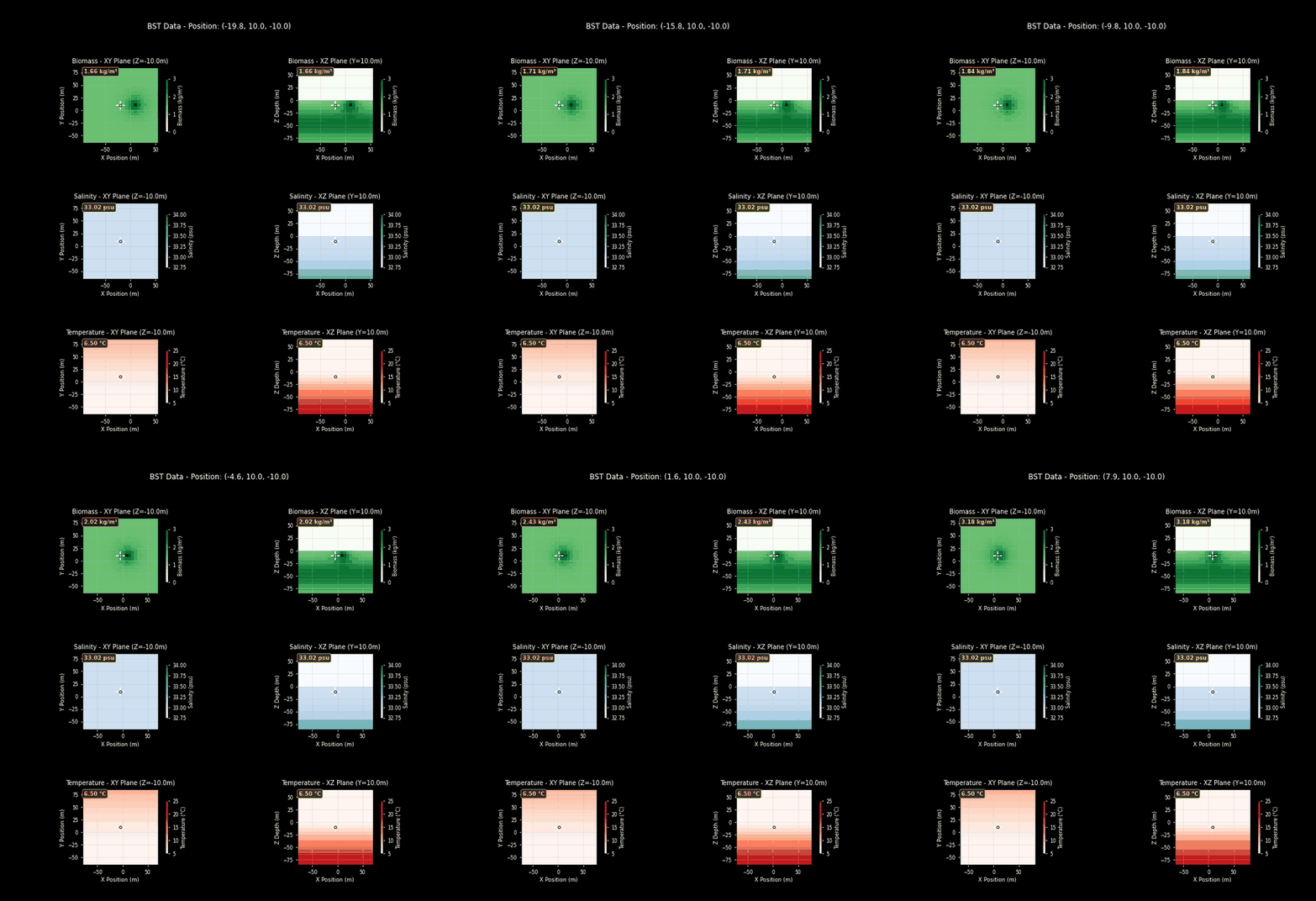
本示例演示如何对生物量、盐度和温度的复杂分布进行建模。通过"集群"(cluster),可以在地图上的任意位置放置生物量、盐度或温度的浓度中心,使其不再遵循常规趋势。本场景在基础的生物量和盐度函数模型之上,添加了若干可能代表浮游植物水华的生物量集群,并使用自定义温度函数模拟冰川附近温度随位置的变化。
如需上传自定义函数而不只是调整现有参数,请在脚本中调用 env.set_biomass_function("auv0", new_biomass_function)、env.set_salinity_function("auv0", new_salinity_function) 或 env.set_temperature_function("auv0", new_temperature_function),分别用于设置生物量、盐度或温度。其中 "auv0" 是您要修改的载具名称,new_temp_function 是您的自定义函数,它至少接受一个 3 元素的一维数组(位置)并返回对应数值。
注意
实时更新热图会带来明显的性能开销。本示例使用 Python 多进程在独立进程中更新热图,在保持实时显示的同时显著提升模拟性能。如果您希望使用 BST 传感器的绘图功能,强烈建议采用多进程方式。
运行后使用键盘控制载具移动,按 - 键退出。
import holoocean
import numpy as np
from pynput import keyboard
from multiprocessing import Process, Queue
import time
from holoocean.environments import HoloOceanEnvironment
from queue import Empty

def temp_fx(location):
    # NOTE: It's required that we name this parameter "location"
    x, y, z = location
    base_temp = 4
    alpha = -.2
    beta = .05
    return base_temp + alpha * z + beta * y

scenario = {
    "name": "test_currents",
    "world": "PierHarbor",
    "package_name": "Ocean",
    "main_agent": "auv0",
    "ticks_per_sec": 60,
    "frames_per_sec": 60,
    "agents": [
            {
                "agent_name": "auv0",
                "agent_type": "HoveringAUV",
                "sensors": [
                    {
                        "sensor_type": "BSTSensor",
                        "socket": "COM",
                        "configuration": {
                            "biomass_clusters": [{"position":[10, 10, -10], "strength": 2, "falloff": 10}]
                        }
                    },
                    {
                        "sensor_type": "LocationSensor",
                        "socket": "COM"
                    }
                ],
                "control_scheme": 0,
                "location": [-20, 10, -10]
            }
        ],
    }

pressed_keys = list()
force = 200

def on_press(key):
    global pressed_keys
    if hasattr(key, 'char'):
        pressed_keys.append(key.char)
        pressed_keys = list(set(pressed_keys))

def on_release(key):
    global pressed_keys
    if hasattr(key, 'char'):
        pressed_keys.remove(key.char)

listener = keyboard.Listener(
    on_press=on_press,
    on_release=on_release)
listener.start()

def parse_keys(keys, val, visualizer=None, location=None):
    command = np.zeros(8)
    if 'i' in keys:
        command[0:4] += val
    if 'k' in keys:
        command[0:4] -= val
    if 'j' in keys:
        command[[4,7]] += .1 * val
        command[[5,6]] -= .1 * val
    if 'l' in keys:
        command[[4,7]] -= .1 * val
        command[[5,6]] += .1 * val

    if 'w' in keys:
        command[4:8] += val
    if 's' in keys:
        command[4:8] -= val
    if 'a' in keys:
        command[[4,6]] += val
        command[[5,7]] -= val
    if 'd' in keys:
        command[[4,6]] -= val
        command[[5,7]] += val

    if 'm' in keys:
        if visualizer is not None and location is not None:
            visualizer.update_position(location)


    return command

def plot_process(location_queue, scenario, custom_temp):
    print("Process started")
    visualizer = HoloOceanEnvironment.initialize_bst_graphs(config=scenario, temperature_func=custom_temp)

    while True:
        latest_location = None
        while True:
            try:
                latest_location = location_queue.get_nowait()
            except Empty:
                break

        if latest_location is not None:
            visualizer.update_position(latest_location)

        time.sleep(.01)

if __name__ == "__main__":
    time = 0
    with holoocean.make(scenario_cfg=scenario, start_world=False) as env:
        # Here we pass in the custom function into the live graph instance to get accurate figures
        queue = Queue()
        queue.put(scenario["agents"][0]["location"])
        p = Process(target=plot_process, args=(queue, scenario, temp_fx))
        p.start()
        env.set_temperature_function("auv0", temp_fx)
        while True:
            # We need to pass the same custom function into the BST sensor to get accurate readings in the terminal
            sensor_data = env.tick()
            location = sensor_data["LocationSensor"]
            queue.put(location)
            bst_data = sensor_data["BSTSensor"]
            # print(bst_data)
            time += 1

            if '-' in pressed_keys:
                break

            # Your control logic
            command = parse_keys(pressed_keys, force)
            env.act("auv0", command)

        # Clean up
        p.join()